Light Waves: Visible Light · Holder Guide

Reveal Your Light Wave

re-inscription · any content · your wallet, your timing · no app required

Your piece reveals the moment its sat carries a second inscription. That is the whole mechanism, and you can do it yourself in a few minutes.

What a Reveal Is

What the code is looking for

Every Light Wave is an inscription that lives on one specific sat. When the artwork renders, its code looks up that sat and asks a single question: is there a second inscription on it? If there is, the piece reveals, and the ID of that first re-inscription becomes the seed that decides which of the possible outcomes you get. If there is not, the piece stays unrevealed.

Nothing else is involved. There is no server, no approval, and nothing on our side to switch on. The reveal is written into the artwork itself, so it works the same today as it did on launch day, and it will keep working long after any website is gone.
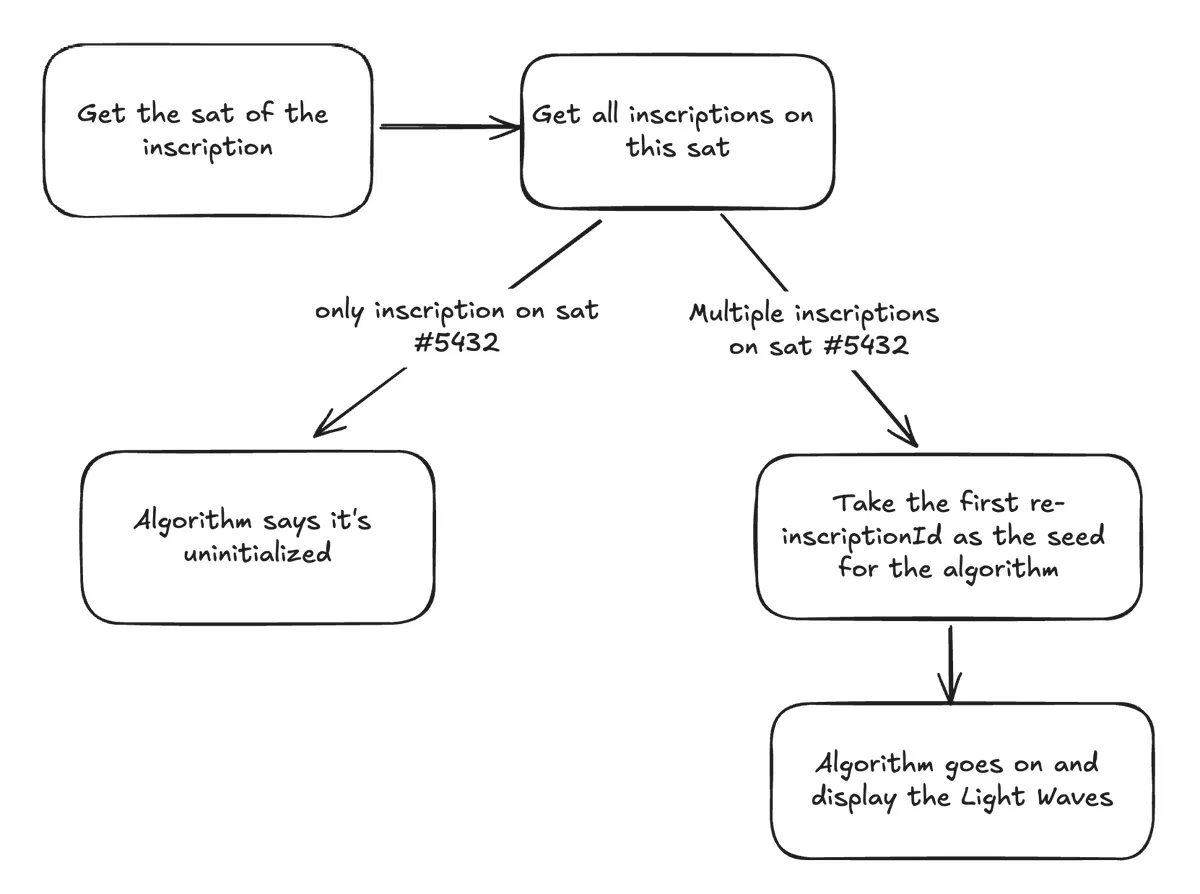
Hand-drawn flowchart showing the Light Waves reinscription algorithm: it looks up the sat holding the inscription, and if multiple inscriptions share that sat, it uses the first re-inscription ID as the random seed that determines the revealed artwork.
How the reinscription seed algorithm works

What to Inscribe

Anything at all

The content of the re-inscription does not touch the artwork. Only its existence, and its ID, matter. So the cheapest reveal is a blank text file: a few hundred sats in fees when the network is quiet.

If you would rather leave something meaningful on the sat, you can. A note, a date, an image, a message to whoever holds the piece after you. It stays with the Light Wave permanently, so choose with that in mind. Cost scales with size.

One rule: it has to be a re-inscription on the sat that holds your Light Wave, not a fresh inscription sent to your wallet. A new inscription on some other sat does nothing.

Step by Step

Re-inscribing on inscribe.dev

The Kanetix reveal app was retired in September 2026. Use inscribe.dev, LIFO's inscription tool. It can re-inscribe onto an inscription you already hold, which is exactly what a reveal needs.

  1. Have the Light Wave in a wallet that inscribe.dev supports, with enough bitcoin in it to cover the fee.
  2. Open inscribe.dev and connect that wallet.
  3. Choose the re-inscription option and select the Light Wave you want to reveal as the target. The tool inscribes onto its sat.
  4. Add your content. For the cheapest reveal, upload an empty .txt file.
  5. Pick a fee rate. Reveals are not time-sensitive, so a low rate and a little patience is fine.
  6. Review, then sign in your wallet. The tool broadcasts the transaction.

Afterwards

Seeing the reveal

Once the transaction confirms, open your Light Wave on ordinals.com or the marketplace you use and reload it. The artwork reads the sat fresh every time it renders, so the revealed piece appears as soon as the re-inscription is confirmed and indexed. Some viewers cache the old render for a while; a hard refresh, or a few minutes, usually clears it.

Vivid Gallery, the partner who launched Visible Light, has hosted a reveal tool of its own. If it is still running it does the same thing, a re-inscription on the same sat, so either route ends in the same place.

Back to Light Waves: Visible Light.